You’re upgrading now—what are you actually buying?
Most iPhone owners don’t buy an Apple Watch because they’re missing a feature—they buy because their day has changed. More workouts, more travel, more time away from a charger, or just wanting a screen that’s easier to read at a glance. The real purchase isn’t “Series 10 vs Ultra 2.” It’s how you want the watch to behave when you’re busy, sweaty, wet, or tired.
Series 10 is the lighter, easier-to-live-with smartwatch choice: slimmer on the wrist, simpler under sleeves, and usually “enough” if your routine stays near a charger. Ultra 2 charges more for bulk, a bigger case, and gear-like priorities—battery headroom, tougher build, and controls you can hit reliably. The catch is you’ll feel that size every day, whether you use the extras or not.
That’s why the first decision is physical: can you wear it all day without thinking about it? The next section starts where you’ll notice the answer fastest—your first week on your wrist.
First week on your wrist: size, comfort, everyday wear
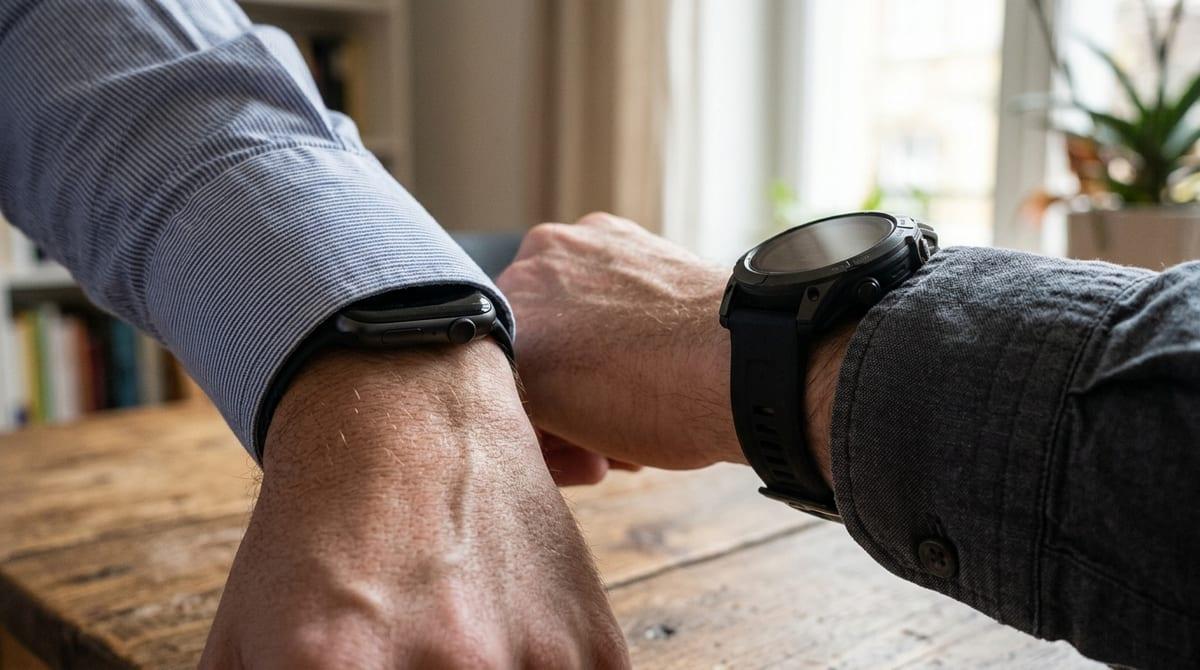
The first week usually has one tell: you keep noticing the watch when you didn’t expect to. That can be a shirt cuff catching, the case tapping a laptop edge, or the band feeling tight by late afternoon after heat and movement. If you’re coming from an older, smaller Apple Watch, the Ultra 2 can feel like it “stands off” the wrist more, and that extra height is what bumps things and prints under sleeves.
Series 10 tends to disappear faster in daily wear—sleep, desk work, and gym sessions—because it’s slimmer and lighter. Ultra 2 can still be comfortable, but it often asks for a more deliberate fit: getting the band tension right, choosing a band that flexes, and accepting that some outfits and activities (tight cuffs, weights that press on the wrist) will feel different.
If you want an all-day watch you forget, Series 10 usually wins. If you’re fine feeling it because you value the bigger, more “grab-and-go” hardware, Ultra 2 starts making sense—until charging becomes the next daily reality check.
Do you hate nightly charging or is it routine?
A lot of people don’t think about battery until the first night they miss it. You get into bed, see 18%, and realize you either lose sleep tracking or you wake up to a dead watch. If you already charge your iPhone every night in the same spot, Series 10 can slot into that habit easily—drop it on the charger while you shower, brush your teeth, or read for 20 minutes.
Ultra 2 earns its price when your schedule breaks routine. A longer battery means you can sleep with it on and still make it through the next day without doing math, and it’s more forgiving when you travel, work late, or forget your charger. That “forgiveness” is the feature. But it isn’t free: faster charging windows matter less if you don’t have a consistent place to top up, and carrying a charger or puck becomes another thing to manage.
If charging feels like a daily chore you resent, battery headroom should weigh heavily—because it changes how often you have to think about the watch. That battery decision also shapes your next frustration point: how the screen and controls behave when you’re moving, wet, or wearing gloves.
Screen and controls when you’re moving, wet, or gloved

You notice this fastest when you’re mid-task: carrying groceries, pushing a stroller, holding a subway pole, or starting a workout with sweaty hands. Taps that feel fine at a desk can miss when your wrist is bouncing, and water can turn the screen into a mess of false touches—especially if you’re trying to end a timer, pause a run, or answer a call quickly.
That’s where Ultra 2’s bigger display and more “hardware-first” controls pay off. A larger target is easier to hit while moving, and the extra physical control options are simply more reliable when your finger is wet or you’re wearing light gloves. Series 10 still works well for most everyday interactions, but it leans harder on precise touch input, so you may find yourself slowing down to get it right.
The real downside is bulk: bigger, easier controls come attached to a bigger case. If you’ll actually use the watch in rain, on runs, or in cold weather, that reliability matters—then durability stops being theoretical.
How rough is your life: durability, water, and bumps
You usually learn “durability” from normal clumsy moments: the watch catches a door frame, taps a countertop, or scrapes a dumbbell handle during a lift. If that happens once a month, Series 10 is typically fine—you might baby it a bit, maybe add a case or a screen protector, and move on. If it happens once a week, you’ll start treating your watch like something that has to survive you, not the other way around.
Ultra 2 is built for that kind of life. The bigger case and tougher materials don’t just reduce the odds of a crack; they reduce the mental load of wondering whether each knock “counted.” The cost is real, though: you’re wearing more watch all day, and protective bands and cases on Series 10 can erase some of its comfort advantage while still not matching the Ultra’s confidence around repeated bumps.
Water is similar. If you’re mostly dealing with sink splashes and rain, either works. If you’re regularly in open water, hitting water sports, or rough on gear, ruggedness becomes a daily feature—then the outdoor tools start becoming the reason to choose Ultra 2 at all.
When outdoor features become the reason you’ll use it
Most people don’t “use outdoor features” until a day goes long: a hike that starts late, a run that turns into getting turned around, or a weekend where your phone stays buried in a pack. In those moments, Ultra 2 stops being a nicer smartwatch and starts acting like simple gear—more battery cushion, a screen you can read in harsh light, and controls you can hit without taking your focus off what you’re doing.
The difference shows up when you rely on the watch for navigation, pace, or safety instead of just logging the workout. If you’re doing long routes, trail running, open-water sessions, or travel days where you want tracking without babysitting your charge, Ultra 2’s “built for outside” bias saves friction. If your outdoor time is mostly city runs and gym work, Series 10 will still capture the data, and you may never touch the tools you paid extra to carry.
The catch is you can’t try “outside life” for a week in a store. You have to be honest about how often you’ll leave your phone behind—and how much you dislike doing battery math when you do.
Paying the difference: regret-proof picks for common lifestyles
Most people end up choosing based on what their “annoying day” looks like. If yours is mostly office, errands, gym, and sleep tracking near a charger, Series 10 is the safer buy: it stays comfortable under sleeves, feels lighter at a desk, and still gives you the Apple Watch basics without paying for hardware you won’t press often.
If your annoying day involves missed charges, long workouts, travel days, cold-weather runs, or regular bumps against gear, Ultra 2 is the regret-proof pick. You’re paying for less babysitting—battery cushion, bigger targets, and tougher confidence—but you also pay in daily bulk. If you hesitate about size now, you’ll notice it every single day.